AWS SES vs SendGrid: what the cheaper bill makes you build
Amazon SES Essentials charges $0.16 per 1,000 emails, so 100,000 emails cost $16 a month, and 250,000 cost $40. SendGrid's Email API lists $34.95 for 100,000 on Essentials and $89.95 on Pro, and $249 for 300,000, where SES would charge $48. SES Essentials is the lower bill at every volume we checked, and the gap widens with scale: $18.95 a month at 100,000 emails, $201 a month at 300,000. What the gap pays for is a set of jobs SES leaves to you: leaving the sandbox, wiring events through AWS services, building the search page your support team will ask for, and managing per-region credentials. This page prices the difference and lists those jobs so you can decide whether the saving is real for your team.
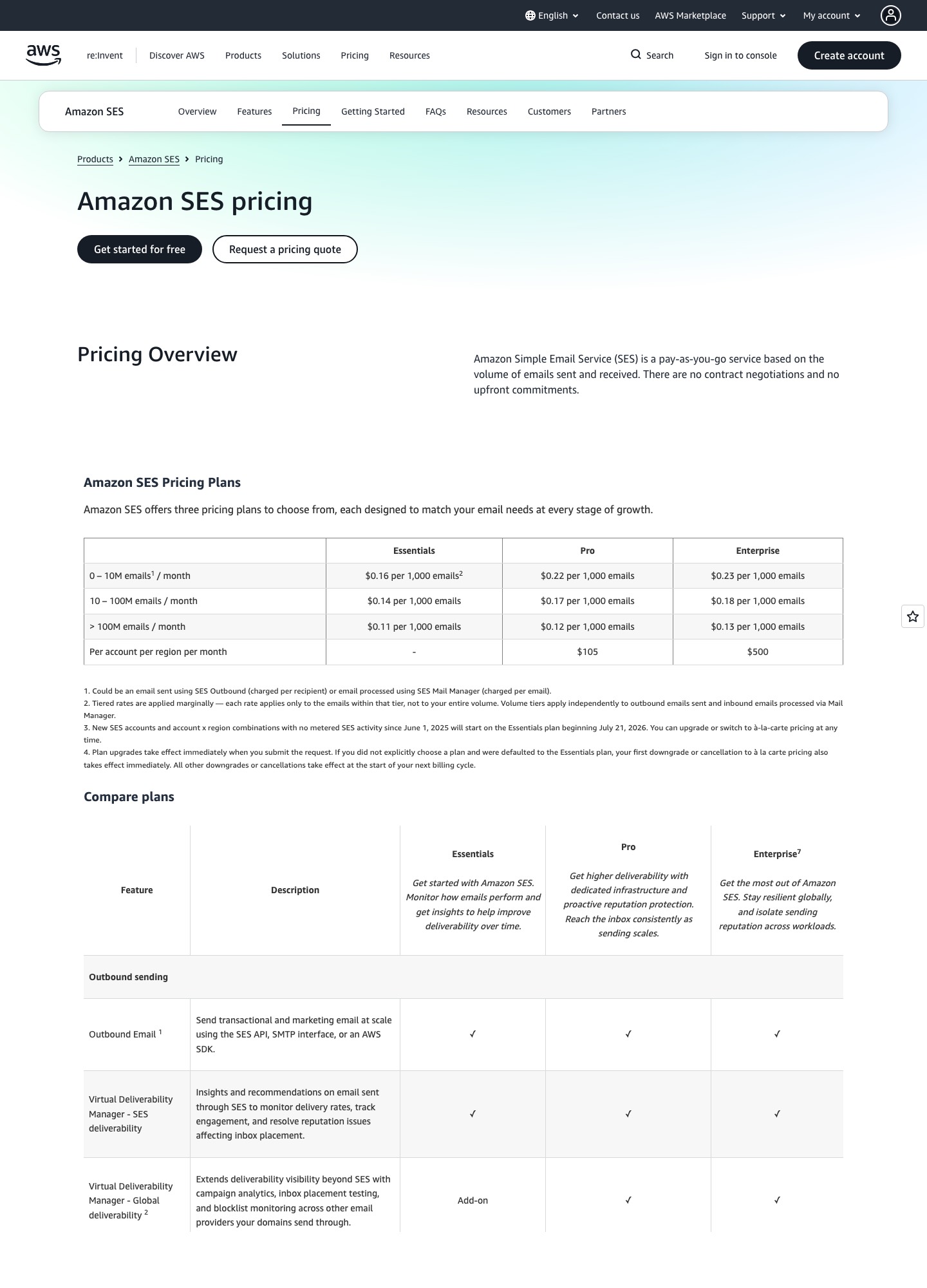
How SES prices a month of sending
SES publishes three plans, and since July 21, 2026, new accounts start on Essentials unless they pick another. Tiered rates apply marginally, so each rate covers only the emails inside its band.
| SES plan | 0 to 10M emails | 10M to 100M | Fixed fee per account per region |
|---|---|---|---|
| Essentials | $0.16 per 1,000 | $0.14 per 1,000 | None |
| Pro | $0.22 per 1,000 | $0.17 per 1,000 | $105 a month |
| Enterprise | $0.23 per 1,000 | $0.18 per 1,000 | $500 a month |
Without a plan, "à la carte" sending is $0.10 per 1,000 emails. Attachments add $0.12 per GB of attachment data, and AWS's own worked example for 250,000 messages of 32KB each shows $40.00 for sending plus $0.96 for outgoing data, a total of $40.96. A standard dedicated IP is $24.95 a month per address on à la carte pricing, and Pro lists managed dedicated IPs as included. New AWS customers can receive up to $200 in credits, and the free plan runs for six months after the account is created.
Cost at 10,000, 50,000, 100,000 and 250,000 emails
| Monthly volume | SES Essentials | SES Pro | SendGrid |
|---|---|---|---|
| 10,000 | $1.60 | $107.20 | $19.95 floor; no step below 50,000 |
| 50,000 | $8.00 | $116.00 | $19.95 (Essentials) |
| 100,000 | $16.00 | $127.00 | $34.95 (Essentials), $89.95 (Pro) |
| 250,000 | $40.00 | $160.00 | $249 at the 300,000 stop (Pro) |
The SES figures are the volume divided by 1,000, times the rate: 100,000 / 1,000 x $0.16 = $16, and for Pro the same volume costs 100 x $0.22 + $105 = $127. They leave out attachment data and any dedicated IP fees. SendGrid's numbers are the plan cards shown by its volume selector, which skips from 100,000 to 300,000, so 250,000 emails would be sold at the 300,000 stop.
Compare like with like. SES Essentials against SendGrid Essentials is $16 against $34.95 at 100,000, a gap of $18.95 a month, or $227.40 a year. SES Pro against SendGrid Pro is the closer fight because both bundle a dedicated IP. At 100,000 emails SendGrid Pro at $89.95 is $37.05 cheaper than SES Pro at $127. At 300,000 the order reverses: SES Pro is 300 x $0.22 + $105 = $171 against $249, so SES is $78 cheaper. On Essentials, the 300,000-email gap is $249 - $48 = $201 a month, or $2,412 a year.
What the SES price does not include
The sandbox and production access
AWS places every new SES account in a sandbox, separately in each region. While in it you can send only to verified addresses and domains or the mailbox simulator, at most 200 messages per 24 hours and one message per second, and bulk suppression actions are disabled. You request production access, and AWS says verifying your domain first helps get the request approved faster. See AWS's production access guide. SendGrid's trial is also limited, at 100 emails a day for 60 days, but its page says no credit card is required to begin.
Credentials per region
The SMTP interface uses its own username and password, which are not your AWS access keys, and the SMTP interface guide says they are unique to each region. A team that sends from two regions manages two sets. SendGrid uses one host and one API key.
Events go through AWS services
SES publishes events to a configuration set's event destinations, and AWS lists CloudWatch, Data Firehose, EventBridge, Pinpoint and SNS as choices (event destination guide). The JSON records carry an eventType of Bounce, Complaint, Delivery, Send, Reject, Open, Click, Rendering Failure, DeliveryDelay or Subscription (event contents). SendGrid gives you webhook endpoints instead (1 on the trial, 2 on Essentials, 5 on Pro), with an activity view of the same events next to them. SES asks you to decide whether events feed a queue, a stream or a function, and then to write the consumer that updates your user records.
Search, dashboards and suppression handling
SendGrid's pricing page lists searchable email activity with 3 days of history on Essentials and 7 on Pro, bounce classification into seven categories, suppression management and a dynamic template editor. SES lists Virtual Deliverability Manager on all three plans for delivery insights, and an account-level suppression list, but delivery search for a support agent is something you assemble from the events above. Mail Manager, SES's inbound processing, is a separate product priced at $0.15 per 1,000 emails processed on à la carte pricing.
When SES wins and when SendGrid does
Choose SES when your application already runs on AWS, you send 100,000 or more emails a month, and an engineer will own bounce handling and event consumers. At $16 for 100,000 emails the price barely registers in a cloud bill, and the fixed fees stay at zero on Essentials. The saving is a year-one $227.40 at 100,000 emails; whether that beats the days you spend building depends on your own engineering rate, so run that sum before you commit.
Choose SendGrid when the people who triage failed deliveries are not engineers, when you want an activity search and event webhook working the day you sign up, or when you have no AWS account to bill. Its Essentials plan at $19.95 for 50,000 emails also reads cheaper than building anything at that volume.
Choose SES Pro over SendGrid Pro only if you want managed dedicated IPs and deliverability insight and send well above 100,000 emails. Near 100,000, SES Pro's $105 account fee makes it the dearer of the two.
Moving from SendGrid to SES
- Verify your sending domain in SES for each region you plan to use, and enable DKIM signing. Keep SendGrid's CNAME records until its queue is empty.
- Submit the production access request before you export anything, because suppression-list bulk actions are disabled in the sandbox.
- Create a configuration set with an event destination and consume Bounce and Complaint events first, since those protect your sender reputation.
- Export SendGrid's bounce, spam report and unsubscribe lists and load them into SES's account-level suppression list.
- Move low-risk mail first, such as password resets, then the rest, watching SES's bounce and complaint figures as volume grows.
In the other direction, authenticate the domain at SendGrid, create a scoped API key, switch on the Event Webhook, and keep your SES region live until bounce notifications have drained.
Related pages
See the Amazon SES pricing guide for plan-by-plan detail, Amazon SES alternatives if the build list is too long, and SendGrid alternatives for other managed options. For SendGrid against a rival with a free plan, read Mailgun vs SendGrid.
FAQ
Is Amazon SES free?
Not permanently. AWS says new customers can receive up to $200 in credits and that the free plan is available for six months after the account is created; after that sending is billed per 1,000 emails.
Can I use SES without leaving the sandbox?
Only for testing. In the sandbox you can send to verified addresses and the mailbox simulator, at 200 messages per 24 hours and one per second, so production sending needs an approved request.
Does SES include a dedicated IP?
On à la carte pricing a standard dedicated IP is $24.95 a month each. The Pro plan's feature table lists managed dedicated IPs as included, and SendGrid Pro includes one IP in its $89.95 starting price.
How much does a 32KB message cost on SES?
AWS's own 250,000-message example at 32KB puts outgoing data at $0.96 on top of $40.00 for sending, which works out to about $0.004 per 1,000 emails.