Mailjet vs SendGrid: small-volume value against high-volume price
Mailjet is the better buy at the bottom of the range and SendGrid is the better buy from 50,000 emails up. Mailjet's Free plan gives 6,000 emails a month, its Starter plan is $9 for 8,000 and Essential is $19 for 15,000, while SendGrid has no published step below 50,000 and starts at $19.95. At 50,000 emails Mailjet Essential is $40 against SendGrid Essentials at $19.95, and at 100,000 Mailjet Premium is $112 against $34.95 or $89.95 at SendGrid. Mailjet also bundles contact lists, segmentation and an email editor into the same price, so the comparison is partly between a sending API with campaign tools and a sending API with a separate campaigns product.
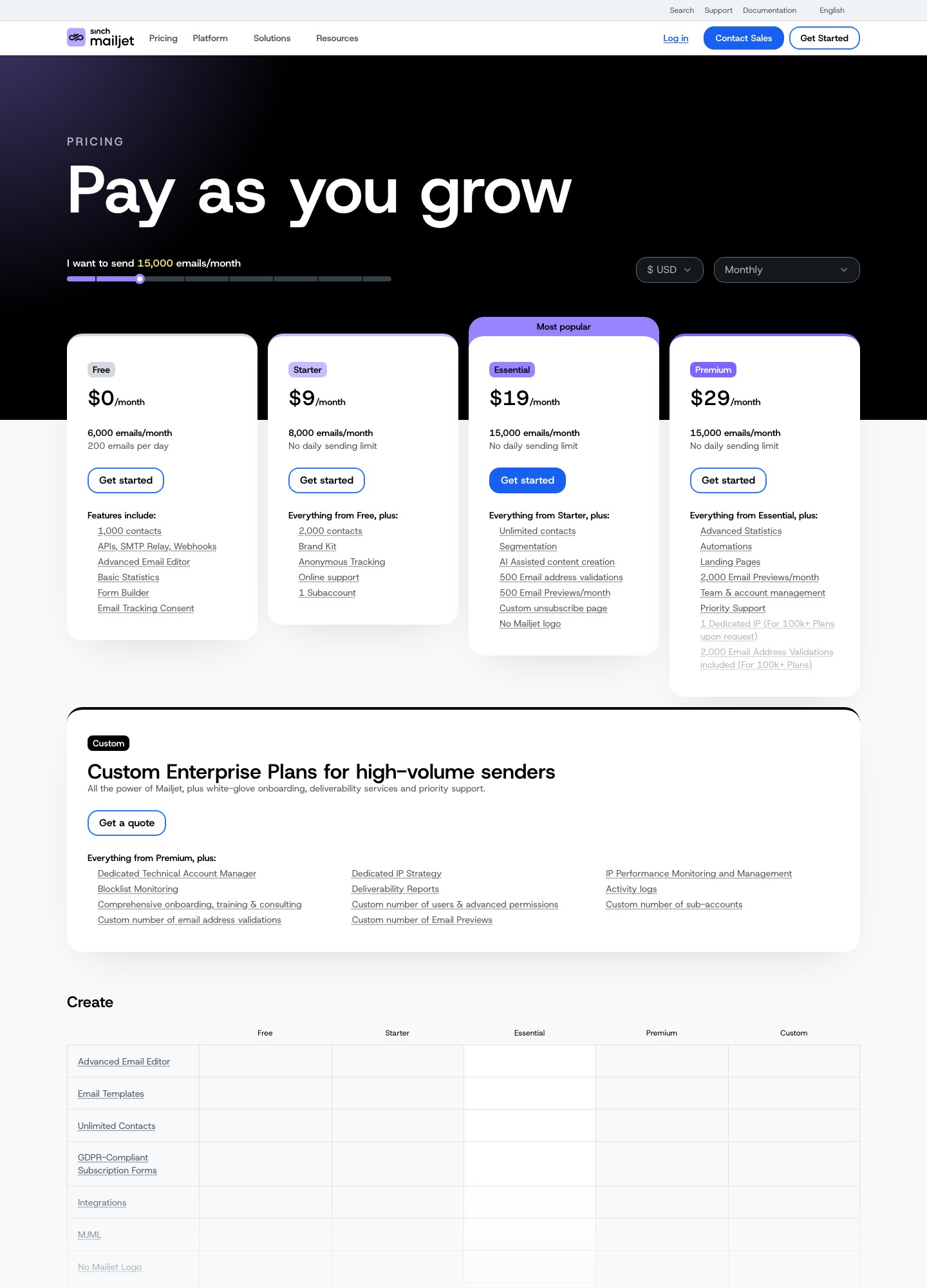
Mailjet's four plans
| Plan | Price | Emails per month | Notable inclusions |
|---|---|---|---|
| Free | $0 | 6,000, capped at 200 a day | 1,000 contacts, API, SMTP relay and webhooks, email editor |
| Starter | $9 | 8,000, no daily limit | 2,000 contacts, brand kit, online support, 1 subaccount |
| Essential | $19 at 15,000; $40 at 50,000 | Up to 50,000 | Unlimited contacts, segmentation, AI-assisted content, 500 address validations, 500 email previews |
| Premium | $29 at 15,000; $59 at 50,000; $112 at 100,000; $265 at 250,000; $499 at 500,000 | Up to 500,000 and beyond | Automations, landing pages, advanced statistics, priority support, up to 20 subaccounts, dedicated IP on request at 100,000 and up |
Mailjet's slider also shows an annual option at a 10 percent discount. Essential stops at 50,000 emails on the slider, so a sender at 100,000 emails has to buy Premium. For SendGrid's plans, see Mailgun vs SendGrid, which lays them out in full.
Cost at 10,000, 50,000, 100,000 and 250,000 emails
| Monthly volume | Mailjet | SendGrid |
|---|---|---|
| 10,000 | $19 (Essential, sized for 15,000) | $19.95 floor; no step below 50,000 |
| 50,000 | $40 (Essential) or $59 (Premium) | $19.95 (Essentials) |
| 100,000 | $112 (Premium) | $34.95 (Essentials) or $89.95 (Pro) |
| 250,000 | $265 (Premium) | $249 at the 300,000 stop (Pro) |
Do the subtraction. At 50,000 emails SendGrid Essentials is $40 - $19.95 = $20.05 a month cheaper than Mailjet Essential, or $240.60 a year. At 100,000 emails the like-for-like comparison is Premium against Pro, because both offer a dedicated IP: $112 - $89.95 = $22.05 a month, so SendGrid Pro is $264.60 a year cheaper. At 250,000 the sticker prices nearly meet: Mailjet Premium at $265 for 250,000 is $1.06 per thousand, and SendGrid Pro's $249 for 300,000 is $0.83. The nearest stops do not line up, but Mailjet gives no volume discount that overturns SendGrid at this scale.
Where Mailjet's price buys something different
If you send 15,000 emails or fewer, the numbers favour Mailjet: $19 against SendGrid's lowest paid price of $19.95, and Mailjet's price includes unlimited contacts, segmentation, a drag-and-drop editor and no daily cap. SendGrid's Marketing Campaigns product is priced separately, with a free plan of up to 2,000 contacts and 6,000 emails a month, then a Basic plan from $15 and an Advanced plan from $60. Teams that run newsletters and receipts from one tool will price the pair together. Mailjet's own pricing page also lists MJML under its Create features.
The free plans differ in kind. Mailjet's Free plan is a standing tier at 6,000 emails a month and 200 a day. SendGrid's Email API gives 100 emails a day for 60 days and stops. For a long-lived internal app that sends fewer than 200 emails a day, Mailjet is a free host and SendGrid is a trial.
Sending call and webhook differences
Mailjet's Send API v3.1 takes a JSON body with a Messages array and authenticates with an API key pair as HTTP basic auth. This sample comes from Mailjet's send a basic email guide; its SandboxMode flag validates the call without delivering mail, so remove it for real sending:
curl -s \
	-X POST \
	--user "$MJ_APIKEY_PUBLIC:$MJ_APIKEY_PRIVATE" \
	https://api.mailjet.com/v3.1/send \
	-H 'Content-Type: application/json' \
	-d '{
      "SandboxMode":true,
      "Messages":[
        {
          "From":{
            "Email":"pilot@mailjet.com",
            "Name":"Your Mailjet Pilot"
          },
          "HTMLPart":"<h3>Dear passenger, welcome to Mailjet!</h3><br />May the delivery force be with you!",
          "Subject":"Your email flight plan!",
          "TextPart":"Dear passenger, welcome to Mailjet! May the delivery force be with you!",
          "To":[
            {
              "Email":"passenger@mailjet.com",
              "Name":"Passenger 1"
            }
          ]
        }
      ]
	}'
The guide stresses two rules. The From address must be a previously validated, active sender, and recipients listed in the same message's To see each other, so a message to many private recipients needs one entry per recipient in Messages. That is the closest counterpart to SendGrid's personalizations, each of which SendGrid describes as its own mail envelope.
Event handling is the larger difference. Mailjet's webhook guide lists open, click, bounce, spam, blocked, unsub and sent events. You set the callback URL through the API's eventcallbackurl resource or in the account's event tracking preferences, and a backup URL can be registered with isBackup. The endpoint must return 200 OK; otherwise Mailjet retries every 30 seconds and gives up after 24 hours unless a new event is generated. For security the guide recommends HTTPS with basic authentication embedded in the URL, and it describes no payload signature. SendGrid's Event Webhook offers an ECDSA signature or OAuth 2.0, and its security guide explains both. A receiver that must prove the sender must therefore add its own checks on Mailjet.
Moving from SendGrid to Mailjet
- Validate each sender address in Mailjet and publish the SPF and DKIM records it gives you; keep SendGrid's records until the old queue clears.
- Rewrite the request: bearer key becomes basic auth with the key pair,
personalizationsbecome entries ofMessages, andtemplate_idbecomesTemplateID. When you use a template, leave outTextPartandHTMLPart. - Register the new callback URL, use basic auth on it, and treat Mailjet's sent event as the closest equivalent to SendGrid's delivered, since its list has no event by that name.
- Export bounces, spam reports and unsubscribes from SendGrid and import them so those recipients are not retried.
- Check subaccount needs. Starter and Essential allow one, while Premium allows up to 20.
Moving from Mailjet to SendGrid
Turn each Messages entry into a personalizations entry and TemplateID into template_id. Mailjet's contact lists and segments do not travel with the sending API, so a team that used them for newsletters would need SendGrid's Marketing Campaigns or another list tool. Enable the Signed Event Webhook for the new endpoint, and expect 3 or 7 days of searchable activity, so keep your own copy of events if you need longer.
Which one to choose
Choose Mailjet if you send under 15,000 emails a month, want one vendor for contacts, an editor and the sending API, or need a free plan that stays free. Choose SendGrid if you send 50,000 or more, care most about the lowest list price per thousand, want a dedicated IP bundled at $89.95, or need cryptographically signed events.
Related pages
See Mailjet alternatives for other exits, SendGrid alternatives, and Postmark vs SendGrid if retention is your concern.
FAQ
Is Mailjet's free plan better than SendGrid's?
For ongoing use, yes: 6,000 emails a month at up to 200 a day with no end date on the page, against SendGrid's 100 emails a day for 60 days.
Which is cheaper at 100,000 emails?
SendGrid, at $34.95 on Essentials or $89.95 on Pro. Mailjet's slider shows Premium at $112 for that volume.
Does Mailjet sign its webhooks?
Its webhook guide recommends HTTPS plus basic authentication in the URL and describes no signature. SendGrid supports ECDSA-signed events and OAuth 2.0.
Can both send through SMTP?
Yes. Mailjet's plans list an SMTP relay alongside the API, and SendGrid's pricing page lists SMTP and API among its integration features.