Plunk vs Resend: an open-source email platform against a managed API
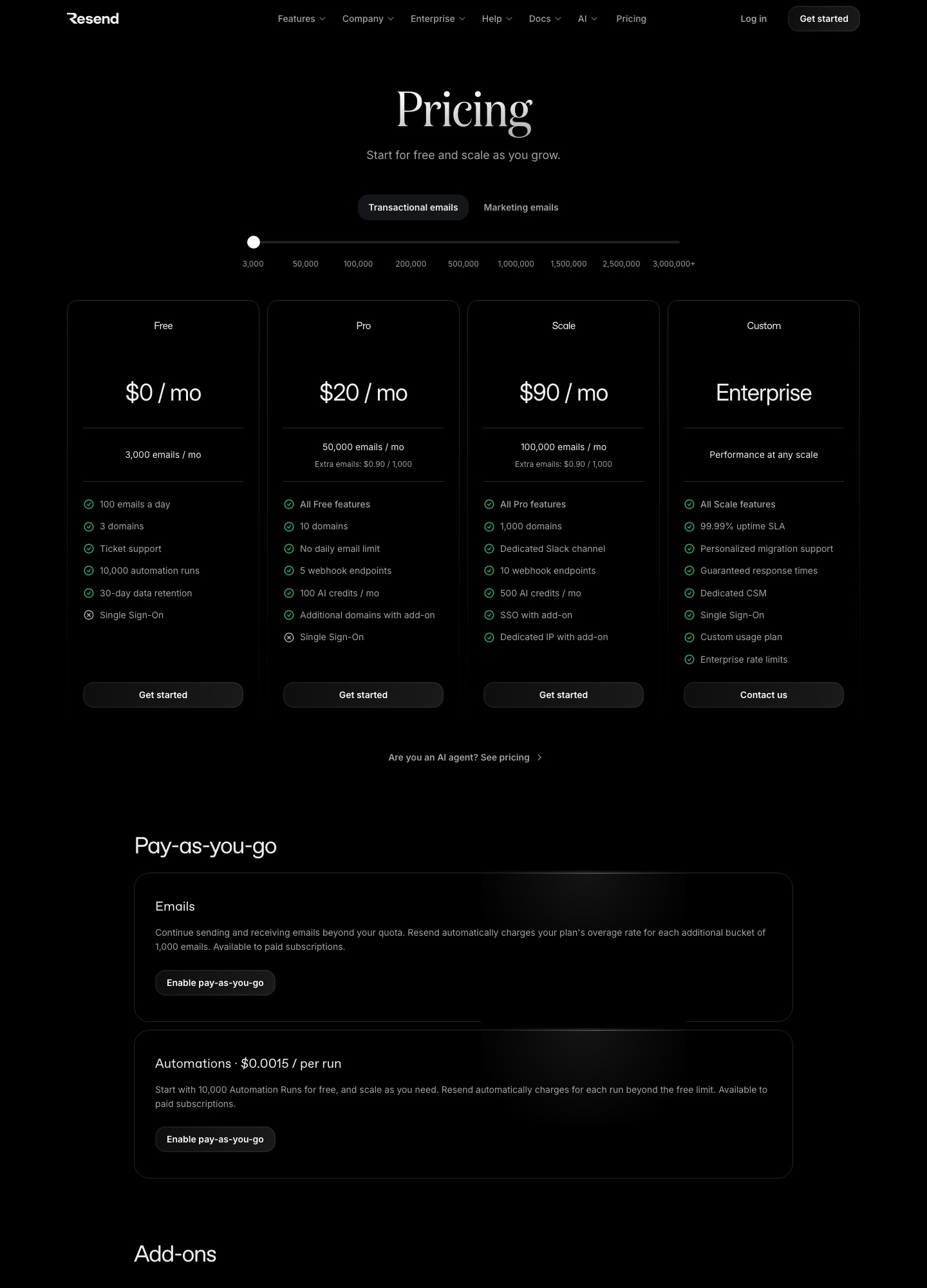
Plunk charges $0.001 per email, which is $1 per 1,000, with no monthly fee and no tiers, and its code is open source under AGPL-3.0 so you can run it yourself. Resend charges $20 a month for 50,000 emails and has a free plan of 3,000. That makes Plunk's hosted service cheaper than Resend Pro's $20 below 20,000 emails a month ($20 ÷ $0.001) and more expensive everywhere above it. At 50,000 emails Plunk costs $50 and Resend $20; at 100,000 emails Plunk costs $100 against Resend's $35 (emails × $0.001). Self-hosted Plunk is a third option, but it still sends through your own Amazon SES account, so the sending fee drops to about $0.16 per 1,000 and a server and its upkeep become yours. Choose Plunk for small or spiky volumes, for self-hosting, or when contacts and workflows should live with the sending. Choose Resend when you will pass 20,000 emails a month and want a flat, predictable plan.
What open source changes in practice
Plunk's repository describes the project as an open-source, self-hostable alternative to SendGrid, Resend and Mailgun, covering transactional email over an API and SMTP relay, campaigns, workflows, segments, analytics, custom domains and inbound email. The license is AGPL-3.0, a network copyleft license; read it before you modify the code and expose the result to other people.
The self-hosting guide lists three prerequisites: Docker with Docker Compose, an AWS SES account for the actual sending, and a domain with subdomains for each service. You download the project's docker-compose.yml, set environment variables and run docker compose up -d. The subdomains it expects are app for the dashboard, api, docs and www, plus an optional smtp host for the SMTP relay. That is a real piece of infrastructure: you own the database, the upgrades, the backups, the availability of the API your product calls, and the SES reputation behind it. The hosted service at useplunk.com removes all of that for $0.001 an email.
Resend has no self-hosted edition. Its webhook ingester is open source for storing event data, but the sending platform is a service you rent. That is exactly what its price buys: the shared IP reputation, suppression handling and deliverability work are done for you.
Cost from 3,000 to 500,000 emails
| Monthly emails | Plunk hosted | Resend | Self-hosted Plunk on SES |
|---|---|---|---|
| 3,000 | $3 | $0 (Free) | $0.48 |
| 10,000 | $10 | $20 (Pro) | $1.60 |
| 50,000 | $50 | $20 (Pro) | $8 |
| 100,000 | $100 | $35 (Pro, slider) | $16 |
| 200,000 | $200 | $160 (Scale, slider) | $32 |
| 500,000 | $500 | $350 (Scale, slider) | $80 |
Plunk's column is emails times $0.001. Its pricing page says "Free plan: 1,000 emails per month. Paid plan: $0.001 per email" and does not say whether the free 1,000 carry over after you upgrade, so the table bills every email; the true bill may be $1 lower. The SES column is emails divided by 1,000 times $0.16, the Essentials rate on Amazon's pricing page, and covers only the sending fee. It leaves out servers, backups and your time, none of which have a price on any vendor page. Resend's $35, $160 and $350 are slider readouts from October 7, 2026; its $20 Pro plan includes 50,000 emails and the Free plan includes 3,000 at up to 100 a day. Full plan tables are on Resend pricing and Amazon SES pricing.
The gap between hosted Plunk and Resend is not constant. Hosted Plunk is $10 cheaper at 10,000 emails (20 − 10); $30 more expensive at 50,000 emails; $65 more at 100,000; $40 more at 200,000; and $150 more at 500,000. Resend's price per extra 1,000 emails falls as you move up its slider, from $0.90 on the Pro and Scale cards to $0.80 at the 200,000 stop, $0.70 at 500,000 and $0.65 at 1,000,000. Plunk's stays at $1.
Billing rules that change the total
Plunk's billing documentation counts every kind of send under one monthly number: transactional API sends, campaign recipients, workflow send steps and inbound emails each cost one credit. An email with attachments costs two credits regardless of size, so a receipts system that attaches a PDF to every message pays $0.002 per email, not $0.001. Inbound mail counts too, and on the free tier it eats into the 1,000-email allowance.
You can set a spending cap for each category (transactional, campaigns, workflows, inbound). When a cap is hit, outbound API calls return 402 Payment Required with the code BILLING_LIMIT_EXCEEDED, and inbound emails are dropped silently until the cap resets. That is useful protection against a runaway campaign, but it means your application must handle a 402 on a password reset. Activation also places two $1.00 charges on your card, an onboarding fee and a card verification, both credited back against usage.
Resend's meter is different. Only mail sent through its /emails API counts against the transactional allowance, as do received emails, while broadcasts count against contacts. Paid plans can continue past the quota with pay-as-you-go, billed in buckets of 1,000, and Resend charges $0.0015 per automation run once the 10,000 free runs on the Free plan are used. Plunk has no per-run fee, because every workflow send is simply another credit.
API shape and webhooks
Plunk authenticates with a secret key (sk_ prefix) in an Authorization: Bearer header and keeps a separate public key (pk_) that can only call the event-tracking endpoint from a browser. The example below is from Plunk's API keys guide; the endpoint reference is Send transactional email.
curl https://next-api.useplunk.com/v1/send \
  -H "Authorization: Bearer $PLUNK_SECRET_KEY" \
  -H "Content-Type: application/json" \
  -d '{ "to": "user@example.com", "subject": "Hello", "body": "<p>Hi</p>" }'
A few details matter if you are porting code from Resend. The HTML goes in body, not html, and there is no plain-text field because Plunk generates one from the HTML. When to is an array, recipients are processed one after another with no batch semantics, and sends are always immediate; scheduled sending is a campaign feature. The Idempotency-Key header works, but a repeated key returns a 409 instead of replaying the original response, and keys last 24 hours by default. The data object accepts a value with persistent: false, which keeps a one-time code or magic link out of the stored contact record. Resend's own Node and idempotency samples appear on Resend vs Mailgun and Resend vs Postmark.
Webhooks differ in philosophy. Plunk has no separate webhook product: you build a workflow triggered by an event such as email.bounce or email.complaint and add a Webhook step with a URL, optional headers and an optional body. The webhook guide authenticates with a custom header you define (its example is a bearer token), and the page describes no signature scheme. The events are email.sent, email.delivery, email.open, email.click, email.bounce, email.complaint and email.received. Resend registers endpoints directly, signs each request, retries on a long schedule and lets you replay messages, with event names such as email.delivered, email.bounced and email.delivery_delayed (event types). Resend Free allows one webhook endpoint, Pro five and Scale ten.
Domain setup
Plunk's domain verification needs three DKIM CNAME records, one SPF TXT record and one MX record for bounce handling, with DMARC and a custom MAIL FROM domain optional. It warns that a domain can have only one SPF record, so an existing Google Workspace record must be merged rather than duplicated, and says verification usually completes in a few minutes but can take up to 72 hours. Resend's add a domain flow asks for DKIM and SPF records as TXT plus MX or CNAME, recommends a subdomain, and notes that proxying a CNAME through Cloudflare prevents verification. Both lead to the same advice on DMARC, covered in our SPF, DKIM and DMARC guide.
Which one to pick
Plunk hosted suits a product sending under 20,000 emails a month, or one whose volume swings: a month with 2,000 emails costs about $2 (2,000 × $0.001) and nothing is wasted on an unused tier. It also suits teams that want contacts, workflows and sending in one tool with unlimited contacts, and teams that like the option of leaving for a self-hosted install.
Self-hosted Plunk suits an engineering team that already runs containers and SES, wants its data on its own infrastructure, and prefers owning an outage to renting one. Do not choose it to save money at 10,000 emails a month; the sending fee is under $2 but the time is not free.
Resend suits anyone past 20,000 emails a month, anyone who wants signed webhooks with automatic retries and replay, and anyone who prefers an SDK with React Email support to a REST call. If you want to see where else a flat plan can go, compare Resend alternatives and Amazon SES alternatives.
Moving from Resend to Plunk, or back
- Verify the sending domain at the new provider on a subdomain and merge, never duplicate, SPF records.
- Change the request shape:
htmlbecomesbody, the sender becomes a string or a{ name, email }object, and the API key moves to a bearer header. Add anIdempotency-Keyheader where retries exist and handle the409. - Rebuild webhooks as Plunk workflows with a Webhook step, add your own authentication header, and map
email.deliveredtoemail.deliveryandemail.bouncedtoemail.bounce. - Cap spending per category in Plunk before cutover and make the application tolerate a 402.
- Import suppressions and unsubscribed contacts first; Plunk keeps contacts and subscription state, so migrating the list matters more than on a pure API provider.
- Going back to Resend, replace workflow-based automations with Resend's automations or your own queue, and expect to pay the $0.0015 per-run price after the free 10,000.
FAQ
Is Plunk free if I self-host it?
The software is free, but sending still goes through your own AWS SES account, which is billed per email, and you run the servers. Plunk's docs list Docker, an SES account and a domain as the prerequisites.
At what volume does Resend become cheaper than hosted Plunk?
Above 20,000 emails a month, where Plunk's $0.001 per email reaches Resend Pro's $20 flat price. Below that, Plunk costs less; Resend's Free plan covers the first 3,000 emails at no cost.
Does Plunk's pricing include marketing email?
Yes. Plunk counts campaign recipients, workflow sends and transactional sends under the same $0.001 rate, with unlimited contacts and no feature tiers.
Can I stop a runaway send on Plunk?
You can set a monthly cap per category in Settings, Billing, and sends past the cap fail with a 402 error. Build your retry logic so a reset email is queued, not lost, when that happens.