Postmark vs Mailgun: message streams, routes and what 50,000 emails cost
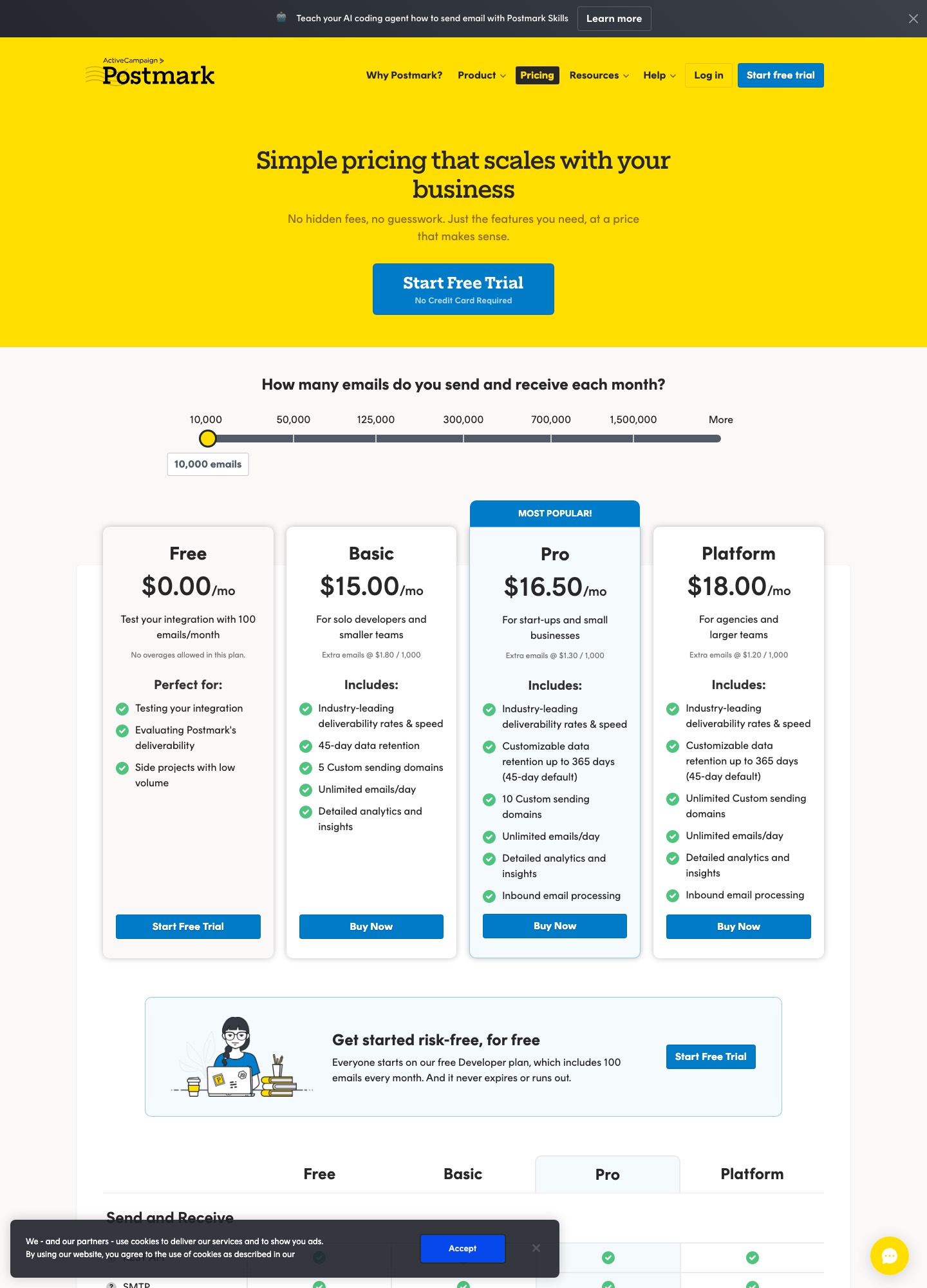
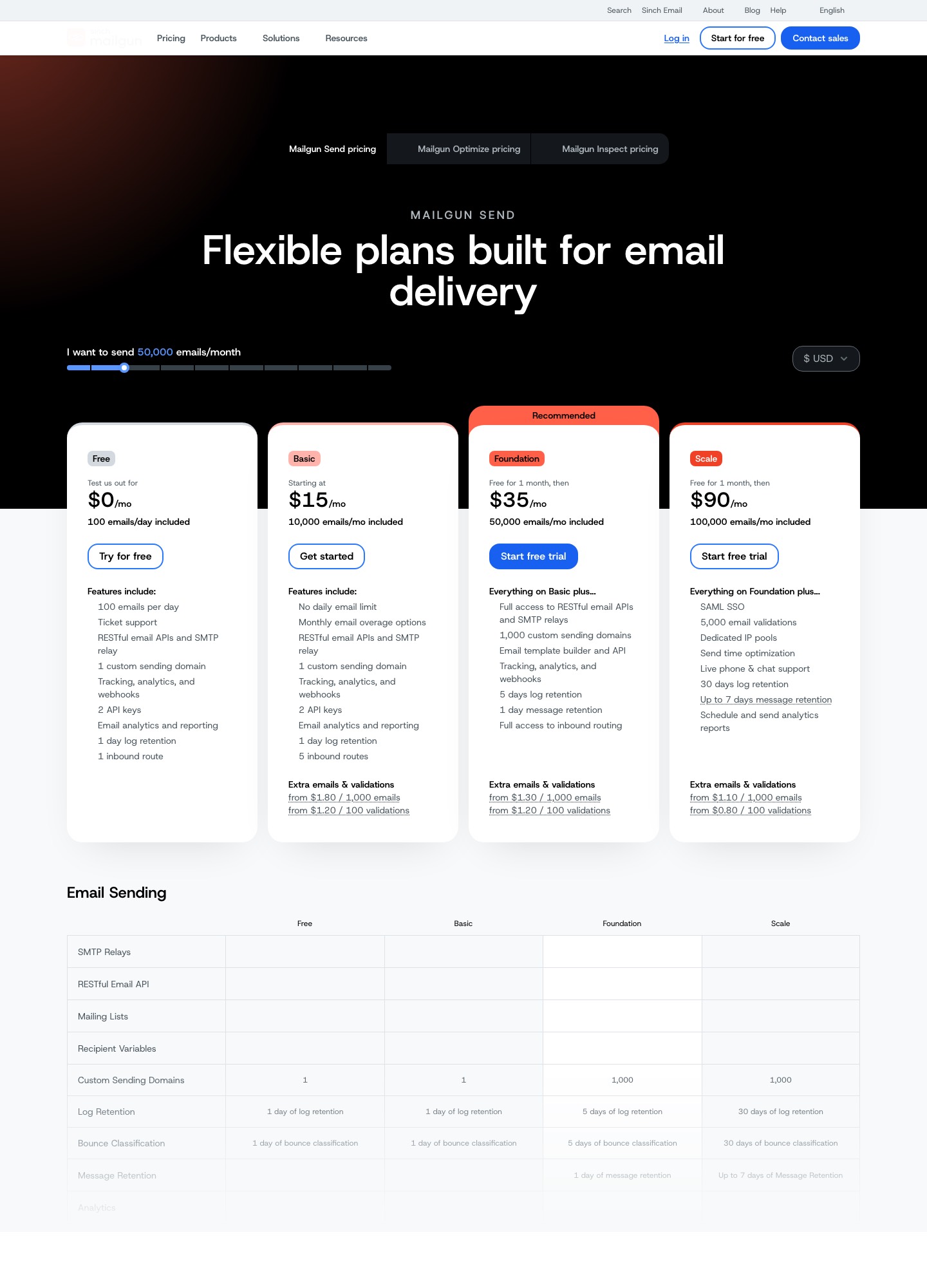
Postmark and Mailgun both list a $15 plan for 10,000 emails a month, and then they part ways. At 50,000 emails Mailgun's Foundation plan is $35 while Postmark's slider shows $55 for Basic, but Postmark Basic keeps 45 days of activity data against a single day on Mailgun Basic, sends transactional and broadcast mail through separate infrastructure, and protects webhooks with Basic auth instead of a signature. Mailgun counters with 1,000 sending domains from Foundation up, inbound routes built from filter expressions, HMAC-signed webhooks and dedicated IP pools on Scale. Choose Postmark when answering "where did this receipt go?" matters more than the monthly bill. Choose Mailgun when you are buying volume, running many sending domains or parsing inbound mail.
The $15 entry plans are not the same product
| Entry plan | Postmark Basic | Mailgun Basic |
|---|---|---|
| Monthly price | $15 | $15 |
| Included emails | 10,000 | 10,000 |
| Extra emails | $1.80 per 1,000 | from $1.80 per 1,000 |
| Activity or log history | 45 days | 1 day |
| Custom sending domains | 5 | 1 |
| Daily sending cap | none | none |
| Inbound | not listed on the Basic card | 5 inbound routes |
The free tiers differ in shape too. Postmark's Free plan is 100 emails a month with no overages allowed, which is enough to test an integration and little else. Mailgun's Free plan is 100 emails a day with one day of log retention and one inbound route, so it can carry a small production app. Both prices and limits are on the Postmark and Mailgun pricing pages; our own summaries live at Postmark pricing and Mailgun pricing.
The row that decides most support workflows is history. A customer who writes in on Thursday about Tuesday's password reset can be answered from Postmark Basic's 45-day activity feed, whereas on Mailgun Basic that message left the logs two days earlier. Mailgun's Foundation plan lists 5 days of log retention and Scale lists 30 days, so the gap closes only as you pay more.
Cost at 10,000 to 250,000 emails
| Monthly emails | Postmark | Mailgun |
|---|---|---|
| 10,000 | $15 (Basic) | $15 (Basic) |
| 50,000 | $55 Basic, $60.50 Pro, $66 Platform | $35 (Foundation) |
| 100,000 | not a slider stop | $75 (Foundation slider), $90 (Scale plan) |
| 125,000 | $115 Basic, $126.50 Pro, $138 Platform | not a slider stop |
| 250,000 | not a slider stop | $215 (Scale slider) |
The two sliders use different stops, so the vendors overlap only at 10,000 and 50,000 emails. Postmark's next stop after 125,000 is 300,000, and for anything between stops you should drag both sliders to your own number rather than trust an interpolation from us.
Do not rebuild these prices from the overage rates. Postmark's cards print "Extra emails @ $1.80 / 1,000" for Basic, yet extending Basic from 10,000 to 50,000 emails at that rate would give 15 + 40 × 1.80 = 87, not the $55 on the slider. Mailgun shows the same pattern: Foundation plus 50,000 extra emails at its "from $1.30" rate would be 35 + 50 × 1.30 = 100, while the slider says $75. In both cases buying the bigger bucket is cheaper than living on overage, so move the slider before an unexpected bill moves it for you.
Message streams versus domains, pools and routes
Postmark's central idea is the message stream. Every server starts with a default transactional stream, ID outbound, and you can add broadcast streams for newsletters and announcements. Postmark states that transactional and broadcast mail run through parallel but separate sending infrastructure, so a spike in complaints on a product-update campaign cannot touch the IPs carrying password resets. The Message Streams API caps a server at 10 streams including the defaults, allows one inbound stream, and does not let you delete the defaults. Each application normally gets its own server and server token, which keeps API access and statistics isolated per product.
Mailgun reaches the same goal with parts you assemble yourself. Foundation and Scale allow 1,000 custom sending domains, so you can give transactional mail its own subdomain and marketing another. Scale adds dedicated IP pools, and the send API accepts an o:sending-ip-pool parameter that pins a message to a pool (see the send reference). That is more flexible and more work: the separation exists only if you keep applying it in code.
Inbound mail splits the products as well. Mailgun's routes pair a filter (match_recipient(), match_header() or catchall()) with an action (forward(), store() or stop()), evaluated in priority order, with 1 route on Free, 5 on Basic and full access from Foundation. Postmark has a single inbound stream per server that posts parsed JSON to a webhook, and its Pro and Platform cards are the ones that list inbound email processing. If your product is a support inbox or a reply-by-email feature, Mailgun's routing language gives you more to work with.
Retention, dedicated IPs and the add-ons that appear later
Postmark keeps activity for 45 days by default and, from Pro up, lets you extend it to 365 days; the custom retention add-on starts at $5 a month. Mailgun's retention scales with the plan: 1 day on Free and Basic, 5 days on Foundation with 1 day of message content, and 30 days on Scale with up to 7 days of message content. Mailgun's events documentation adds that event data is retained for 30 days with access varying by plan, so read both pages before promising an audit window to a customer.
Dedicated IPs follow different rules. Postmark's managed IPs start at $50 a month per IP, require sending 300,000 emails a month or more, and need a Pro plan or higher. Mailgun includes one dedicated IP with Foundation at 100,000 and with Scale, and extra IPs are $59 per IP per month. A sender at 100,000 emails a month therefore qualifies for an IP on Mailgun but not on Postmark. Postmark sells DMARC monitoring as an add-on from $14 a month per domain; Mailgun lists SPF, DKIM, DMARC and BIMI support on its deliverability table without a separate DMARC product.
Webhooks: signatures versus Basic auth
Mailgun signs every webhook POST with an account-wide Webhook Signing Key found under Settings, API Security. Each request carries timestamp, token and signature, where the signature is the HMAC-SHA256 of the timestamp and token joined together. The snippet below is Mailgun's own Node example from Securing Webhooks. The page also suggests caching the token to block replays and checking that the timestamp is not far from the current time.
const crypto = require('crypto')

const verify = ({ signingKey, timestamp, token, signature }) => {
    const encodedToken = crypto
        .createHmac('sha256', signingKey)
        .update(timestamp.concat(token))
        .digest('hex')

    return (encodedToken === signature)
}

// Event webhook: values are under payload.signature
// verify({ signingKey, ...payload.signature })
Postmark does not sign webhooks. Its webhooks overview says it does not currently support HMAC signature verification and recommends HTTP Basic authentication plus allowlisting Postmark's IP ranges, with the credentials written into the webhook URL like this:
https://<username>:<password>@example.com/webhookPostmark's delivery behaviour is documented in detail. It retries on 5xx, 408, 429 and network failures after 1, 5, 10, 10, 10 and 15 minutes, drops events that get any other 4xx answer, tags each request with X-PM-Retries-Remaining and a stable X-PM-Webhook-Trace-Id, and pauses an event type that fails persistently until you verify the endpoint again. For Mailgun's side, the webhook event list separates temporary_fail from permanent_fail alongside accepted, delivered, opened, clicked, unsubscribed and complained. Postmark reports delivery, bounce, spam complaint, open, click and subscription-change events.
Which one to choose
Pick Postmark if the mail is receipts, resets and alerts that people act on within minutes, if the team debugs from message activity rather than from logs it exports, or if you want streams to enforce the transactional-versus-broadcast split for you. Expect to pay more per thousand above 10,000 emails.
Pick Mailgun if you send 50,000 or more a month and care about the bill, if you manage many sending domains for clients, if you need routes to process replies, or if signed webhooks are a security requirement. Budget for the log retention you actually need: only Scale gives 30 days.
Look elsewhere if you need both the lowest price and long retention. Resend's flat tiers are cheaper than both at 50,000 emails (see Resend vs Mailgun and Resend vs Postmark), and Amazon SES undercuts everyone if you accept building your own dashboards (see SES pricing).
Moving from one to the other
- Authenticate a fresh subdomain at the destination before touching production. Mailgun asks for an SPF TXT (merge
include:mailgun.orginto an existing SPF record rather than adding a second one), a DKIM TXT, two MX records at priority 10 and an optional tracking CNAME, and says propagation can take 24 to 48 hours (domain verification guide). Postmark asks for a DKIM TXT and a custom Return-Path CNAME pointingpm_bouncestopm.mtasv.net, verified within 48 hours (verify a domain). - Export bounces, complaints and unsubscribes from the old account and import them before the first live send. Sending to addresses the old provider had already suppressed is how a new sender starts with a bad reputation.
- Re-point webhooks and rewrite the handlers. Event names differ, Mailgun's payload carries a signature object, and Postmark's does not, so authentication changes along with the parsing.
- Rebuild templates. Mailgun's template builder and API sit on Foundation and above, while Postmark templates are addressed by alias with a model of variables.
- Move traffic by class, starting with the lowest-stakes mail, and keep the old DNS records until the last delivery from the old route has finished. Dedicated IPs need their own warm-up; Mailgun lists automated warm-up on its plans and Postmark manages its dedicated IPs for you.
For the DNS side in more depth, read our SPF, DKIM and DMARC guide. To see how either vendor compares with SendGrid, see Postmark vs SendGrid and SendGrid vs Mailgun, or browse Postmark alternatives and Mailgun alternatives.
FAQ
Is Postmark's higher price at 50,000 emails worth it?
It is $20 more per month on the Basic slider ($55 against $35), and what the extra buys is 45 days of activity data against 5 days of logs, plus stream-level separation of transactional and broadcast traffic. If nobody ever searches old messages and you already isolate marketing mail on its own domain, the premium is hard to justify.
Can both handle inbound email?
Yes. Mailgun uses routes with filters and actions and offers 1, 5 or unlimited routes depending on the plan. Postmark gives each server one inbound stream that posts parsed JSON to your webhook, and lists inbound email processing on its Pro and Platform cards.
Which one signs its webhooks?
Mailgun does, with an HMAC-SHA256 of timestamp plus token using your account's signing key. Postmark does not sign; it recommends Basic auth in the webhook URL and an IP allowlist.
Which free plan is more useful?
Mailgun's, for a live app: 100 emails a day, roughly 3,000 in a month, but only one day of logs. Postmark's 100 emails a month with no overages only suits integration testing.