Resend vs SendGrid: the prices match, the limits do not
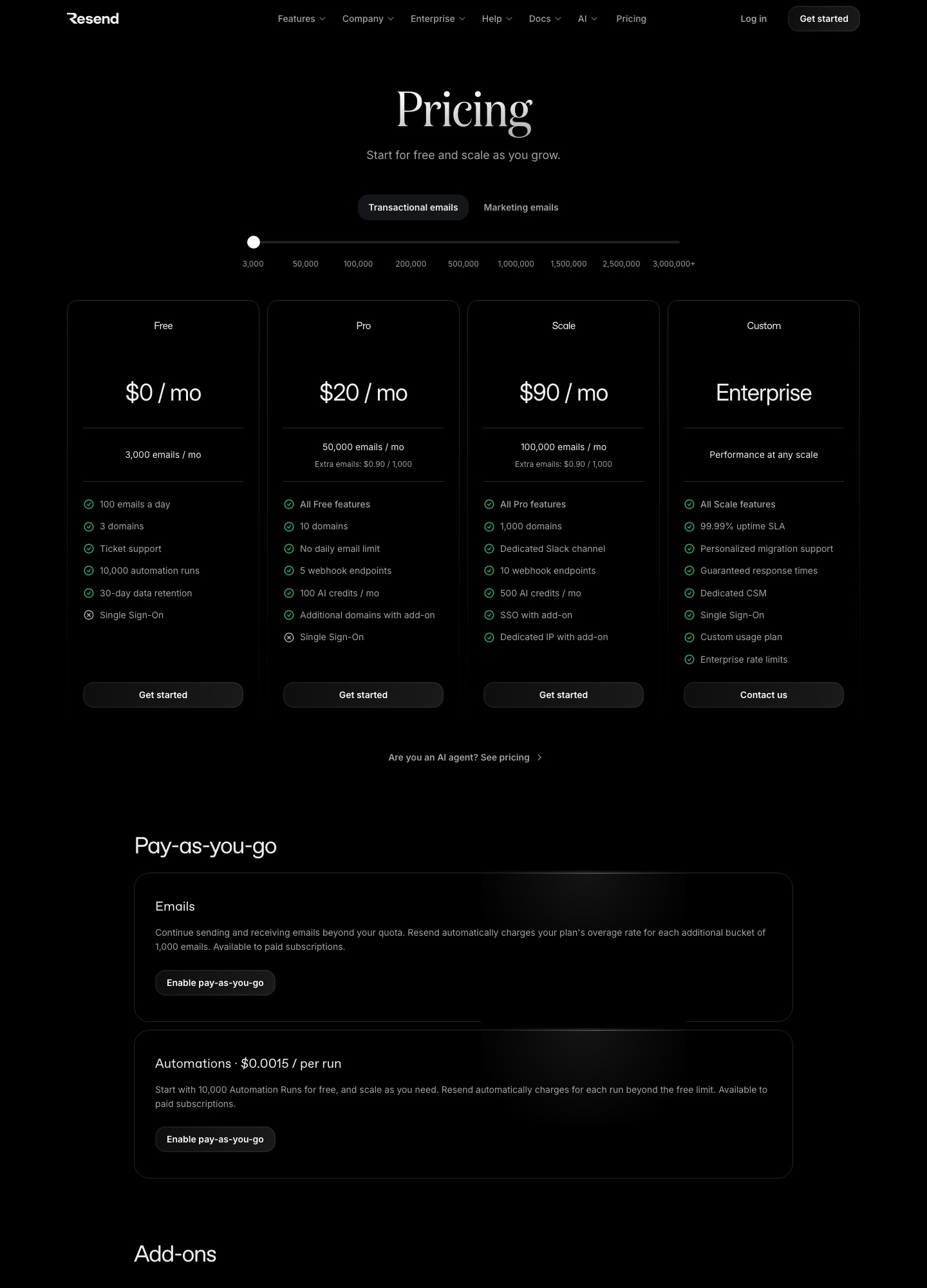
Compare the list prices and you get an oddity: Resend charges exactly five cents more than SendGrid at three different points. Resend Pro is $20 for 50,000 emails against SendGrid Essentials at $19.95. Resend Pro at 100,000 emails is $35 against Essentials at $34.95. Resend Scale is $90 for 100,000 against SendGrid Pro at $89.95. With money a tie, the decision moves to what each plan permits: Resend has a free plan of 3,000 emails a month while SendGrid has a 60-day trial, Resend keeps 30 days of data where SendGrid keeps 3 or 7, and the two disagree on dedicated IPs, teammates, webhook endpoints and how many recipients one API call can carry.
Cost at 10,000, 50,000, 100,000 and 250,000 emails
| Monthly volume | Resend | SendGrid |
|---|---|---|
| 10,000 | $20 (Pro; Free stops at 3,000) | $19.95 floor; no step below 50,000 |
| 50,000 | $20 (Pro) | $19.95 (Essentials) |
| 100,000 | $35 (Pro) or $90 (Scale) | $34.95 (Essentials) or $89.95 (Pro) |
| 250,000 | About $200 (Scale at 200,000 plus overage) | $249 at the 300,000 stop (Pro) |
Resend's slider shows $160 for Scale at 200,000 emails with extra emails at $0.80 per thousand, so 250,000 is 160 + 50 x 0.80 = $200. SendGrid's selector has no 250,000 stop; the next one is 300,000 at $249, which at the same Resend formula would be 160 + 100 x 0.80 = $240. Beyond that Resend lists Scale at $350 for 500,000 emails and $650 for 1,000,000, while SendGrid lists Pro at $499 for 700,000. SendGrid's per-thousand cost at 700,000 is $0.71, and Resend's at 500,000 is $0.70, so neither side runs away with large volume.
Both services bill extra sends separately, and the mechanics differ. Resend's page says overage is a pay-as-you-go setting that you enable, charged at the plan's rate for each additional 1,000 emails; Pro and Scale were $0.90 per thousand at the 50,000 and 100,000 stops. SendGrid says only that overage "may apply" and prints no rate.
Free plans
Resend's Free plan is $0 for 3,000 emails a month, capped at 100 a day, with 3 domains, ticket support and 30-day data retention. It lists one webhook endpoint. SendGrid's Email API offers 100 emails a day for 60 days, no credit card, then you pay at least $19.95. If you run a staging environment or a side project for longer than two months, the standing free plan matters more than any difference in paid pricing. SendGrid's free tier exists only for Marketing Campaigns, at up to 2,000 contacts and 6,000 emails a month.
What each plan limits
| Limit | Resend | SendGrid |
|---|---|---|
| Data or activity history | 30 days on every plan | 3 days Essentials, 7 days Pro |
| Webhook endpoints | 1 Free, 5 Pro, 10 Scale | 1 trial, 2 Essentials, 5 Pro |
| Daily sending cap | 100 a day on Free; none on Pro | 100 a day on the trial |
| Dedicated IP | $30 a month add-on, Scale only, for customers over 3,000 emails a day | One included on Pro |
| Single sign-on | $150 a month add-on, offered on Scale | Included on Pro |
| Domains | 3 Free, 10 Pro, 1,000 Scale | No limit listed on the pricing page |
The pattern is that Resend puts more into the base plan for small senders (history, a free tier, five endpoints at $20) and charges separately for team and network features, while SendGrid's Pro bundles IP, SSO, subusers and 1,000 teammates into its price. If your team has more than a couple of people who need account access, check SendGrid Essentials' single-teammate limit before you assume the saving.
How an API call looks
Resend's send email reference opens with this Node example:
import { Resend } from 'resend';

const resend = new Resend('re_xxxxxxxxx');

const { data, error } = await resend.emails.send({
  from: 'Acme <onboarding@resend.dev>',
  to: ['delivered@resend.dev'],
  subject: 'hello world',
  html: '<p>it works!</p>',
});
A SendGrid call carries the same information in a different shape: a personalizations array of up to 1,000 entries, a from object, a subject and a content array. Resend keeps it flat. For bulk sends, Resend's Batch Email API sends up to 100 emails in one request and counts each batch request as a single call against the rate limit, so a 1,000-recipient SendGrid request becomes ten Resend batch requests. The rate limit is set per team and is the same on every plan.
Resend's send endpoint also accepts an Idempotency-Key request header, which prevents duplicates when you retry a call. Keys must be unique per request, expire after 24 hours and can run to 256 characters. That matters for job queues that retry on timeouts.
Events and webhook trust
Resend's webhook events cover sent, delivered, delivery delayed, bounced, complained, opened, clicked, failed, scheduled and suppressed email events, and a received event for inbound mail. Its verification guide says every webhook is signed with a per-endpoint secret, that you can verify with the Resend SDK or with the Svix libraries, and that the payload must be the raw string body. SendGrid's events (processed, dropped, deferred, delivered, bounce, open, click, spam report, unsubscribe) can be signed with ECDSA, and the signing step is optional. Resend's open and click tracking is a per-domain setting available on every plan, including Free.
Moving from SendGrid to Resend
- Add and verify your sending domain in Resend. The Free plan allows three, and Pro allows ten.
- Rewrite calls:
personalizations[].tobecomes atoarray, andcategoriesorcustom_argsbecome Resend tags, which are key and value pairs. - Re-create SendGrid dynamic templates as HTML you pass in the
htmlfield, or with whatever templating your application already uses. - Load SendGrid's suppression exports through Resend's batch suppression API, so previously bounced addresses are not retried.
- Swap the ECDSA check for Svix-style verification and keep the endpoint count within 5 on Pro.
- Split traffic: send password resets first, then move the rest while you compare delivery records inside Resend's 30-day window.
Back to SendGrid: authenticate the domain, create an API key, and convert tags to categories. You will lose history depth, and Resend's 100-per-request batches turn into one request with a larger personalizations array.
Which to choose
Choose Resend if you want a free plan that does not expire, history you can search for a month, and a flat JSON API your developers already like, and if 100,000 emails at $35 is where you land. Choose SendGrid if you need a dedicated IP and SSO bundled at $89.95, more than a handful of teammates, signed events from day one, or marketing campaigns under the same vendor. At exactly 50,000 emails, flip a coin on price and decide on the table above.
Related pages
For plan detail see Resend pricing and Resend alternatives. Other head-to-heads: Resend vs Mailgun, Resend vs Postmark, and SendGrid alternatives.
FAQ
Is Resend cheaper than SendGrid?
By five cents. At 50,000 emails Resend Pro is $20 and SendGrid Essentials is $19.95; at 100,000 they are $35 and $34.95. Resend has the free plan and the longer history, SendGrid has the bundled dedicated IP on Pro.
Does Resend have a daily sending limit?
On Free, 100 emails a day. Pro's listing says no daily email limit, so the monthly allotment is the cap, with overage if you enable pay-as-you-go.
Can I get a dedicated IP on Resend?
Yes, on Scale, as a $30 a month add-on for customers sending more than 3,000 emails a day. SendGrid includes one on Pro from $89.95.
Which has better webhooks?
Resend gives more endpoints per dollar (5 on Pro against SendGrid's 2 on Essentials) and signs every one. SendGrid's signing is optional but supports OAuth 2.0 as well.